
Slack
September 2024 – October 2024
UX – UI Designer
Enhancing team collaboration with Slack
Problem: Slack Huddles are spontaneous by design. But real-world teams span time zones and deep focus work, making unannounced calls feel disruptive rather than helpful.
What I did: Designed a lightweight Huddle scheduling feature; including time slots, agenda setting, and team invites that integrates naturally into Slack’s existing UI without adding friction.
Result: 76.5% task completion in Maze testing with 25 participants · 4/5 clarity and ease-of-use rating · identified 2 key usability improvements for next iteration.
Schedule a Huddle in Slack, Hi-fidelity prototype
Through this prototype we aimed to test and validate the key scheduling features, and allow users to intiutively interact with the system we envisioned. Our aim was to align this feature with user needs and the project goals.
Context
Overview | What is Slack?
Slack is a group chat app for work. It’s where teams talk, share files, send quick updates, and keep everything in one place instead of sending tons of emails.
It is like WhatsApp, but made for offices, projects in a more professional setting.
What is Huddle?
A Huddle in Slack is a quick, casual call you can start inside a chat.
It’s like saying, “Hey, let’s just talk this through,” and jumping on a mini voice call instantly: no scheduling, no formal meeting link. In Huddles, you can talk on audio, turn on video if you want and share your screen.
It’s meant for quick chats, instead of big formal meetings. It is more like popping over to someone’s desk … but online.
Where is the problem?
The “problem” with Huddles is that they’re designed to be super spontaneous, which isn’t always ideal.
A Huddle is great when everyone is around and free.
But in real life:
- People are in different time zones
- Someone might be in another meeting
- Someone might be deep in focused work
- Not everyone sees the notification right away
So if you just start a Huddle, it can feel a bit random or disruptive.
That’s why sometimes it needs scheduling as
- it gives people time to plan,
- show up prepared, and
- be mentally ready, instead of being pulled into a surprise call
My role
As a product designer, I was responsible for designing the UI, UX, rendering layouts, and creating prototypes. My principal task was quantitative researching, creating frameworks, and design the scheduling feature with prototypes.
Timeline
We followed an agile workflow with ten-week timeline. I had approximately six weeks of dedicated design time, including eight days for initial research, followed by idea generation and iterative development. Between reviews, I allowed 2–3 days for refinements, testing assumptions, and developing prototypes.
Project Brief
How can we make it easier for teams to schedule and participate in Huddles?
User Segment
The focus was on new and existing Slack users who are interested in exploring the possibility of scheduling, collaborate with teams in an organised way.
Current Experience
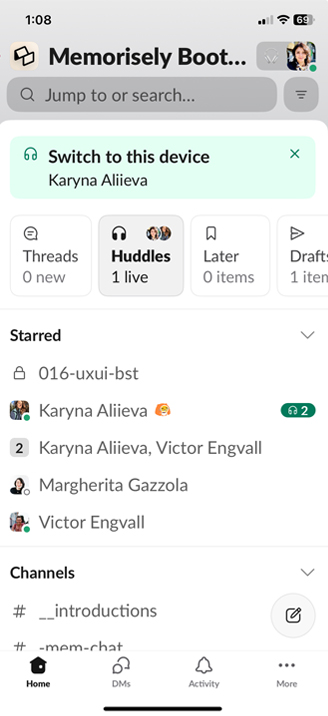
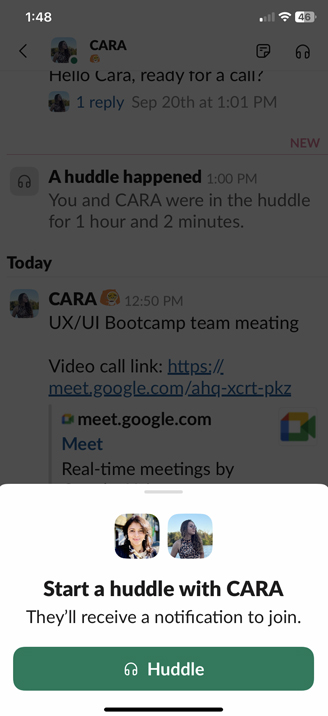
Slack’s Huddle can feel disruptive. Especially when you’re deep in focused work or in a different time zone. It’s like a knock on the door asking you to solve a problem you’re not ready to tackle, leaving you to decline call requests again and again.
Design Process
User Research
01. Survey – Quantitative Research method
For the Slack Huddles, surveys were selected to gather measurable insights at scale about how teams initiate and respond to Huddles across different work contexts.
We translated our research goals into a structured questionnaire, added the questions to a Google Form, and distributed it among our target users. We gathered 14 responses, which helped us identify early quantitative patterns in a focused case study while balancing time and resource constraints.
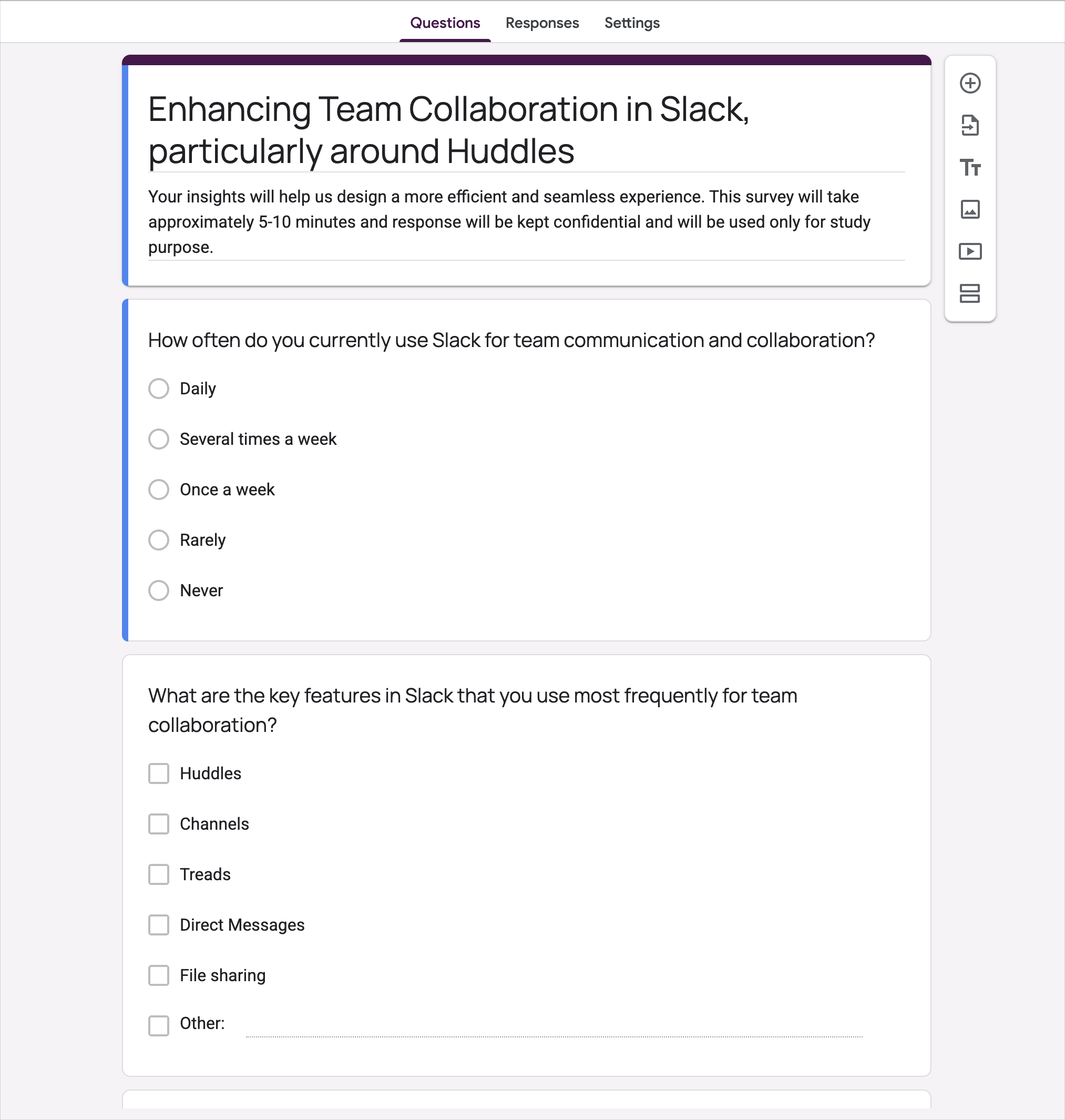
To ensure clarity and encourage participation, the survey began with a brief introduction outlining the purpose of the study and setting expectations. Participants were informed that the survey would take no more than three minutes to complete, helping reduce drop-off and improve response rates.
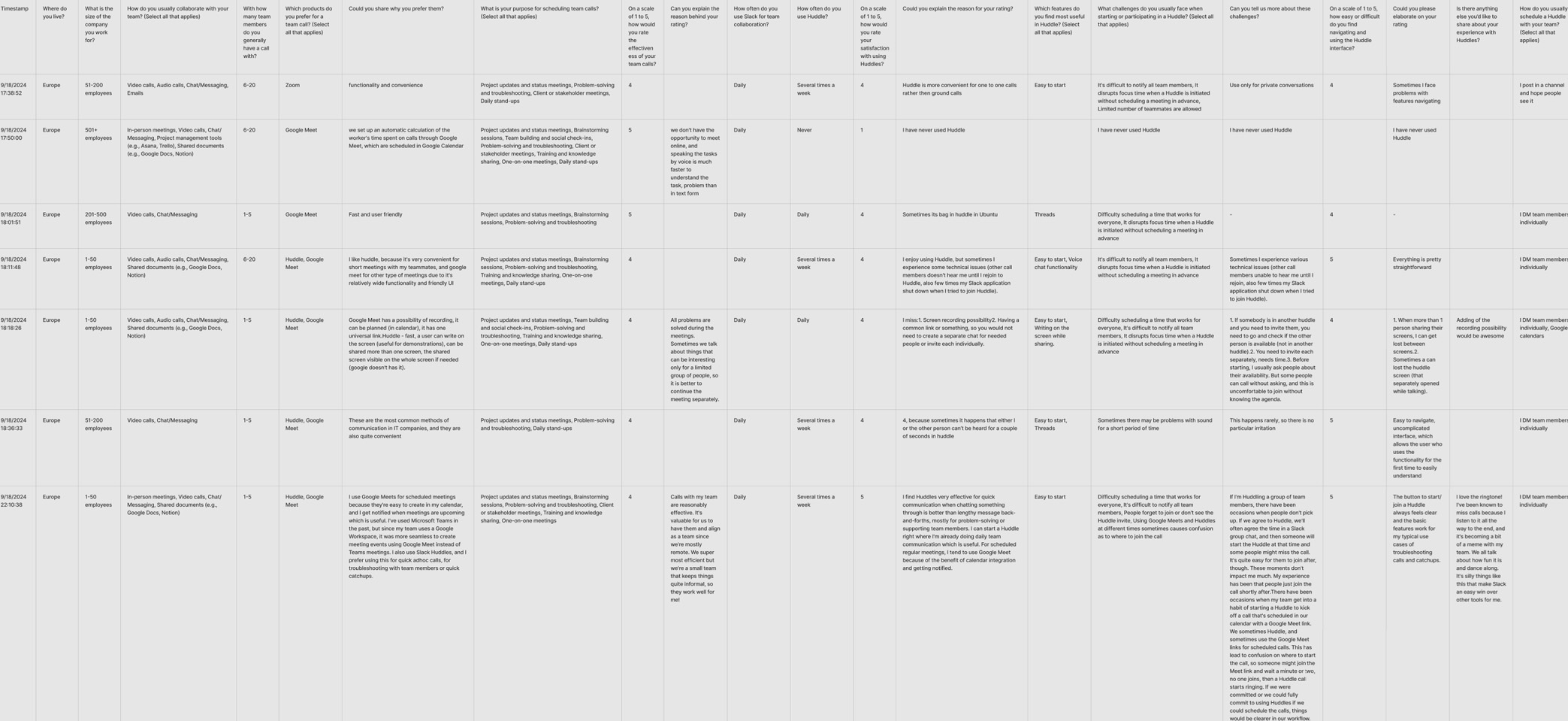
Survey results
The questionnaire primarily consisted of close-ended questions, enabling us to collect quantifiable data efficiently.
By keeping the survey concise and structured, we were able to gather consistent, comparable data while respecting participants’ time, which was an important consideration given that the study itself examines interruptions and workflow efficiency.
“We could fully commit to using Huddles if we could schedule the calls”
“I miss having a common link or something. So you would not need to create a separate chat groups for scheduling a meeting or invite each person individually”
“I use Google Meets for scheduled meetings because they’re easy to create in my calendar, and I get notified when meeting are upcoming which is useful.”
“It’s uncomfortable.. as I end up turning down an impromptu Huddle without knowing the agenda”
Synthesising Survey Data
Using Dovetail : Tagging and Taxonomy
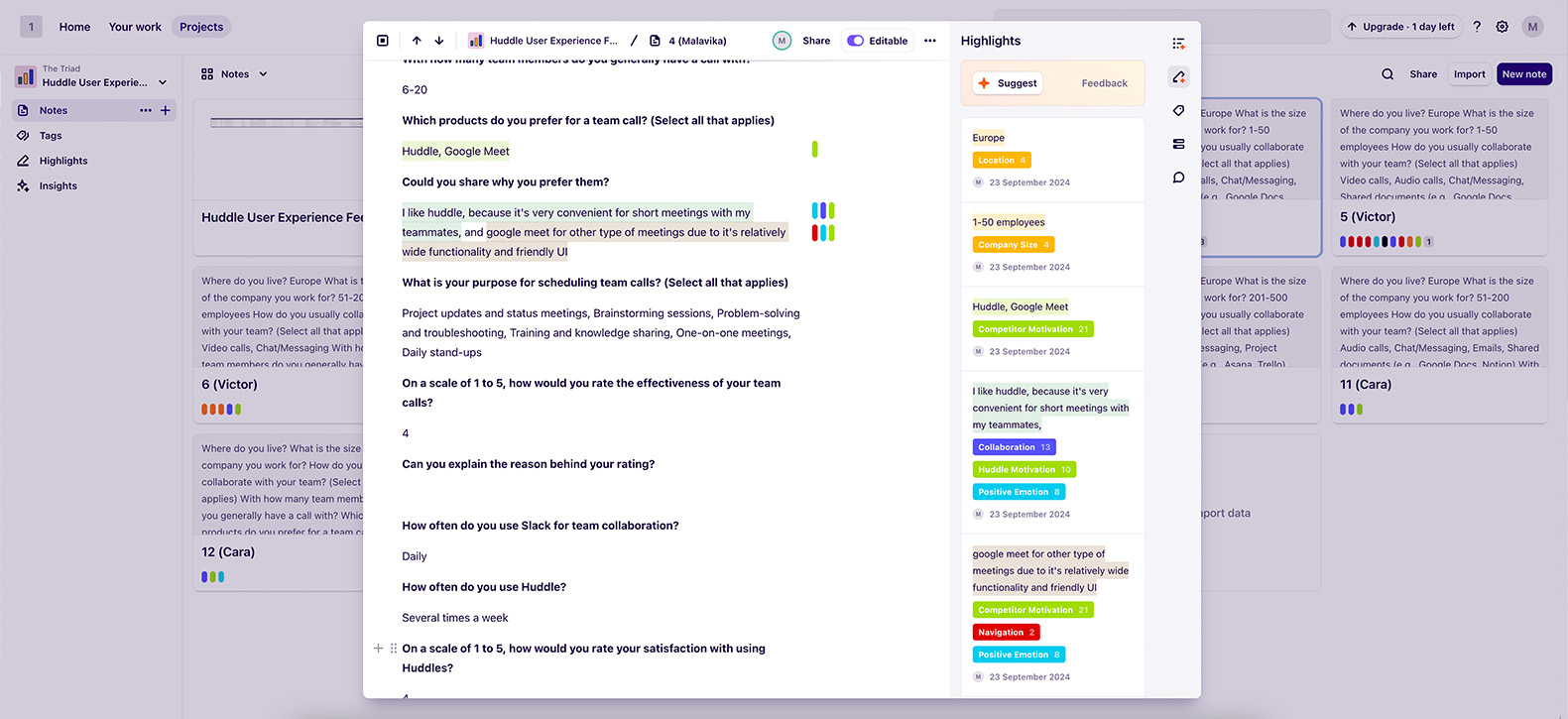
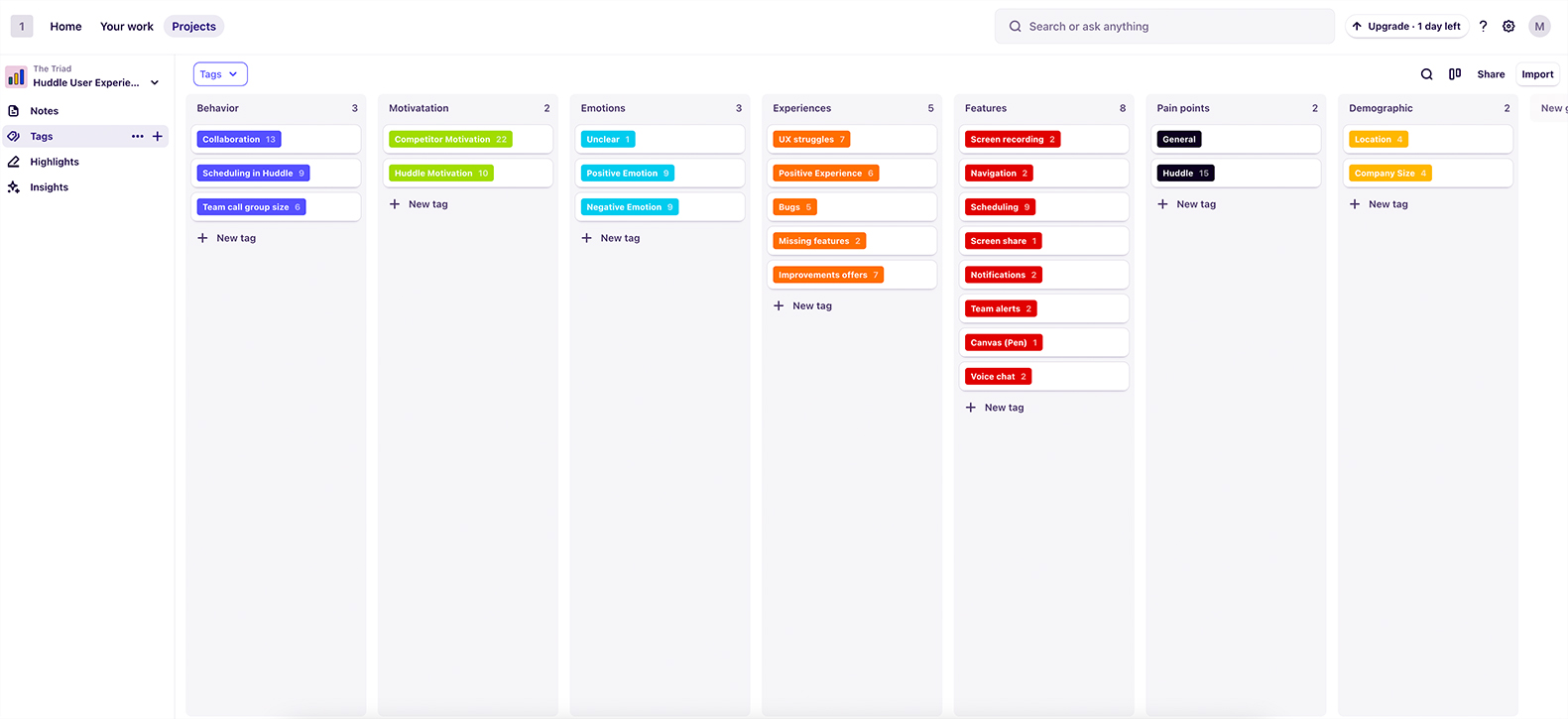
We used software Dovetail to organise all survey results and notes in one place. Key insights were tagged, grouped, and compared across participants. This helped us quickly identify recurring behaviours, pain points, and themes. The tool made synthesis faster and more structured, resulting in clearer insights.
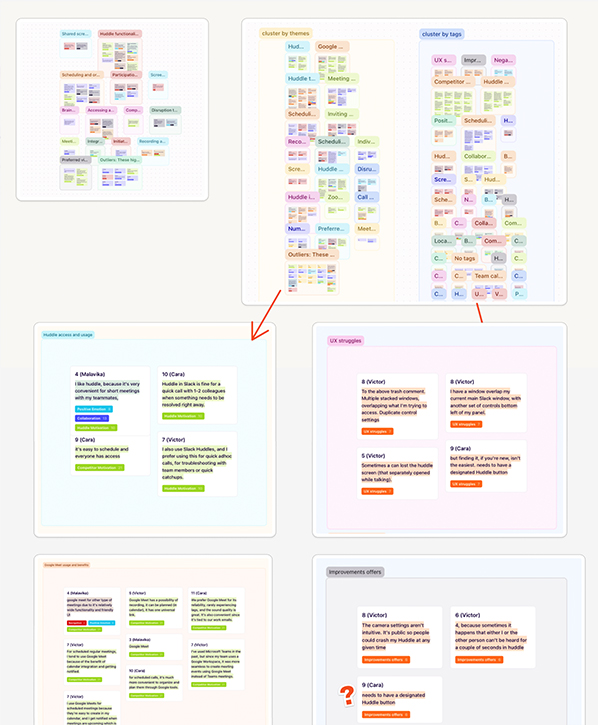
We created an affinity map which organised trends that then we went on to prioritise.
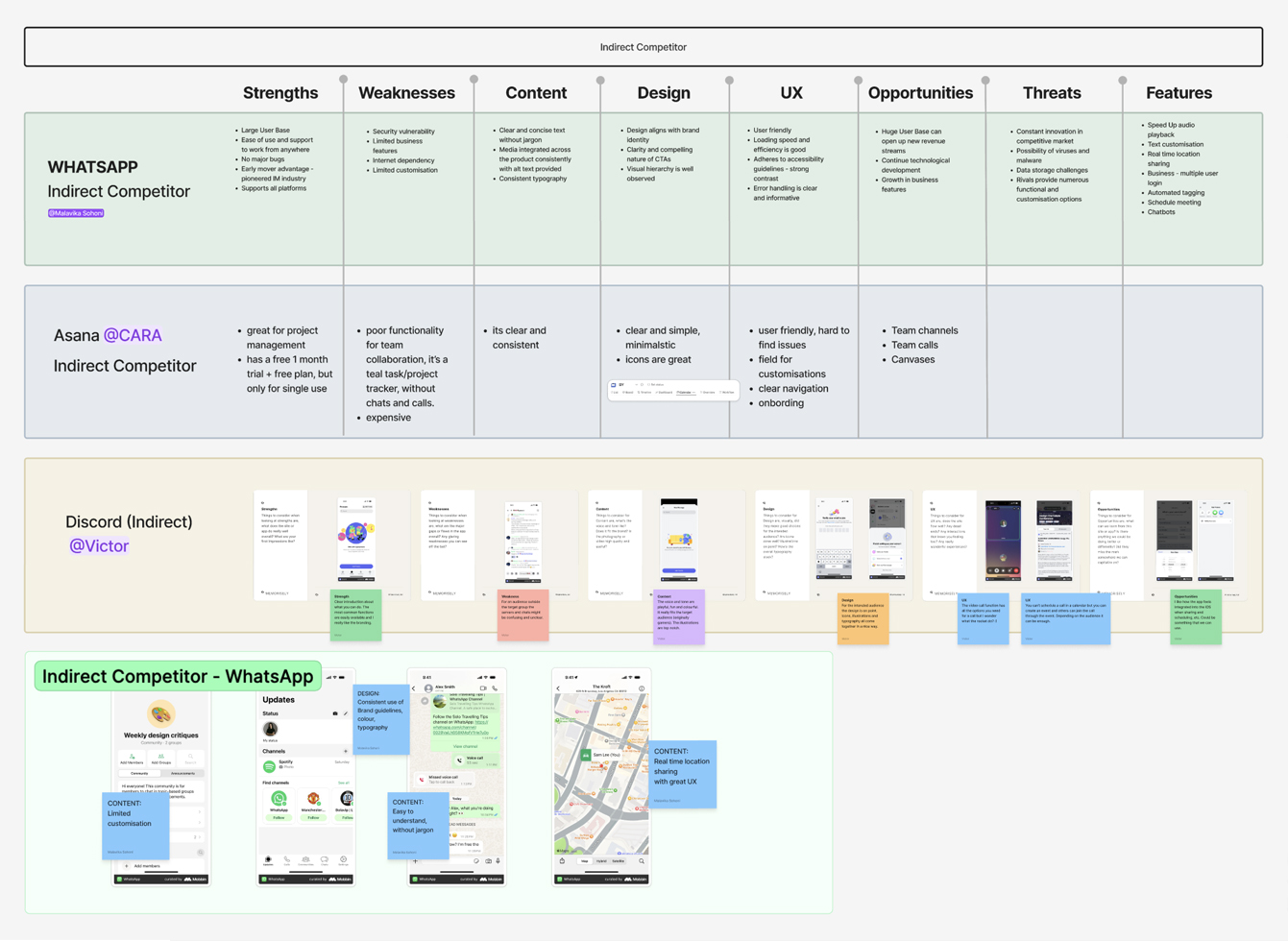
02. Usability Audit and Competitor Benchmarking:
To better understand where users experience friction, we carried out a usability audit of the existing platform. This included a heuristic evaluation based on Jakob Nielsen’s 10 usability heuristics, user-flow walkthroughs to assess task efficiency, and a competitor benchmark to see how similar platforms handle engagement and discovery.
Method: Heuristic evaluation based on Jakob Nielsen’s 10 usability heuristics + user flow walkthrough + competitor benchmarking.
Usability Audit (SWOT) and Competitor analysis
Direct competitors: The competitor benchmarking revealed key strategies including integration with Google calendar, larger participants, up to 1000, clear feedback loops; used by direct competitors.
Google Meet, Zoom, Microsoft Teams
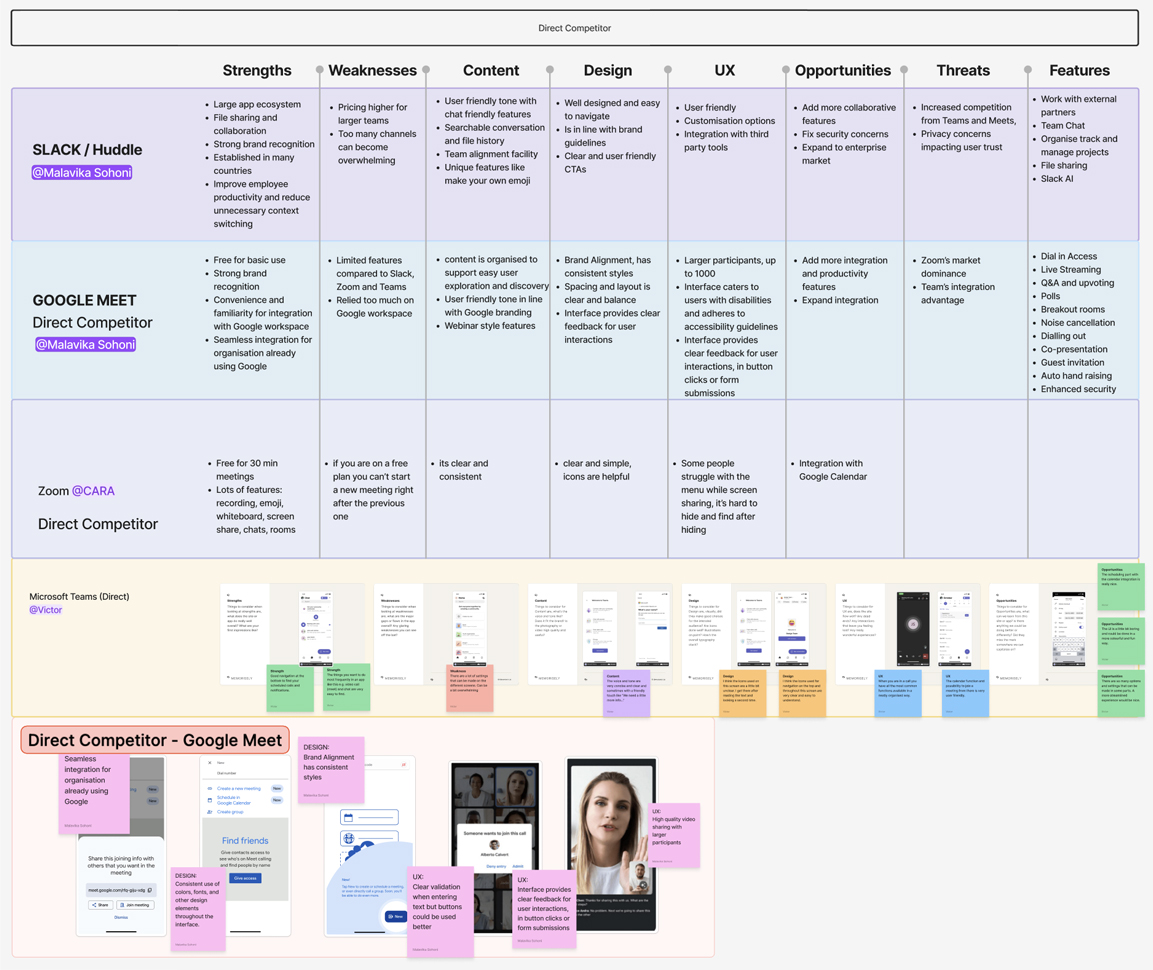
Indirect competitors: The competitor benchmarking revealed key strategies such as team canvas, media integration; used by indirect competitors.
WhatsApp, Asana, Discord
Research Findings :
Key Insights
Users expressed a strong need for the ability to schedule Huddles in advance rather than starting ad-hoc calls and hoping others join.
Users wanted a simpler, more visible way to invite specific team members into a Huddle without additional back-and-forth messaging.
Participants highlighted inconsistent or easily missed notifications, impacting timely participation.
Many respondents indicated that setting a clear agenda beforehand would help make Huddles more purposeful and reduce unnecessary interruptions.
Ideation and Design
Rapid Ideation Process
Mind mapping allowed us to step back from assumptions and explore adjacent opportunities. It highlighted that discovery and evaluation were tightly connected. Teams were moving calls outside of Slack because Huddles couldn’t be scheduled in advance .This guided us in broadening and refining our solution direction.
Discovery of the Problem Statement

Information Architecture

User flow | Schedule a Huddle and AI Integration

Low Fidelity Wireframing
The low-fidelity wireframes focused on introducing a lightweight scheduling flow within Slack Huddles to reduce ad-hoc interruptions and improve alignment. At this stage, the goal was to prioritise structure and functionality over visual polish.
The wireframes explored how users could:
- Select a date and time before starting a Huddle
- Introduce quick time slots for commonly used time frames eg. 10min, 15min 30min meetings
- Add teammates
- Add a brief agenda (eg. weekly meets, daily catch ups – through drop-down) or context note
- Send a scheduled Huddle invite directly within the channel or DM
By keeping the designs simple and task-focused, the low-fidelity wireframes allowed for quick iteration and feedback, ensuring the scheduling feature integrated seamlessly into Slack’s existing workflow without adding friction.


Hi-Fidelity wireframes and interactive prototypes
UI Styles and Variables
We used Figma as our primary design tool to streamline collaboration and maintain consistency throughout the project. We began by defining text and colour styles, along with variables, to establish a scalable design system and ensure we maintain Slack’s visual consistency across all screens. This foundational setup allowed us to make global updates efficiently and reduced design inconsistencies.
Building on this, we created reusable components for commonly used UI elements such as buttons, input fields, and navigation elements. These components helped speed up the design process, improved alignment across the interface, and made future iterations easier to manage.
We used variables and components to ensure that we stay true to Slack’s visual consistency, and have efficiently in making global updates:
Design System : Styles and Variables


Buttons and Reusable components


Quick access to scheduling Huddle through Home screen


User Testing & Feedback
To evaluate the usability of our concept, we conducted a remote Maze test with 25 participants, asking them to schedule a weekly Huddle using the new interface. The results were largely positive, with 76.5% of users successfully completing the task and an average completion time of just over 85 seconds. The experience was well received overall, earning a 4 out of 5 rating for clarity and ease of use, and many users noted that scheduling a Huddle would be a valuable addition to their workflow.
However, the test also revealed a few usability challenges. Some participants struggled to locate the Huddle button, and others found the presence of multiple entry points for scheduling unnecessary and slightly confusing, indicating an opportunity to streamline the experience further.
“The interface is quite easy to navigate. All fields are useful. The choice of durations is good… although does not need to be that granular, can be just 15-30-45-1 hour, etc.”
“I didn’t immediately find the huddle button, I actually clicked it accidentally as I was scrolling. But it’s ok! The selection of people was easy, clear and accessible. The UI of the date and time selection felt a little bleak. Would’ve also been nice to name the huddle meeting”
Closing thoughts
This project taught us that even simple communication tools can create friction if they don’t align with how people actually work. Slack Huddles are designed to be quick and spontaneous, but our research showed that many users are often in deep focus or working across different time zones. Without a way to check availability, schedule a call, or share context, Huddles can sometimes feel like interruptions rather than helpful collaboration.
It also showed us the value of combining user research with simple design solutions. By listening to users and identifying small but meaningful needs, we were able to design features that make collaboration more intentional.
Next Steps
Explore the AI feature.
The idea is simple: After the Huddle ends, AI could analyse the conversation and automatically generate a summary along with key action points for all participants.
This feature has the potential to add significant value for teams managing multiple projects or working asynchronously, as it would help them quickly revisit discussions and stay aligned without needing detailed notes. While we explored this idea as part of the concept, it remained outside the scope of the final delivery due to time constraints.