
Patreon
December 2024 – February 2025
How users discover and engage with creative talent on Patreon.
Objective: To elevate visibility of creators on Patreon by driving user engagement, and expand the ecosystem of support for a more diverse creative community.
I worked as a UI-UX designer on this web application capstone project. I was responsible for re-visiting the search navigation and topic based search and exploration for individual categories.
Hi- Fi Prototype – Search Navigation
Context
Overview | What is Patreon?
Patreon has established itself as a vital platform for creatives to receive support and funding directly from their fans. However, the current discovery process for potential patrons primarily relies on a basic search input field, which is limiting in exposing the diversity and breadth of talent on the platform.
My role
As a product designer, I was responsible for designing the UI, UX, rendering layouts, and creating prototypes. I primarily collaborated with my cohort for this project. My principal task was researching, creating frameworks, and develop content strategy with prototypes to solve the limited search and navigation problem of the current system. We aimed at gaining alignment between project goals and user needs.
Creating a discoverability feature which was intuitive as well as comprehensive was one of most rewarding experiences for me. Having worked with painters, video artists, and media directors for most of my life, proved to be an advantage to me. My experience in the field fuelled a deeper understanding of creator needs, allowing me to contribute to an engaging experience where Patreon connects fans and creators while enabling creators to generate revenue directly.
Timeline
We followed an agile workflow and over the six week timeline, we had four creative reviews. I roughly had four weeks of total design time, as I had six days for the initial design development and then 2-3 days between reviews for edits.
Project Brief
Business Goal
The primary goal for us was to enhance the discoverability of creatives on Patreon, thereby increasing patron engagement and support for a wider range of creators. This improvement needed to lead to increased patronage, higher creator satisfaction, and overall growth in the platform’s user base and revenue.
The Task was to,
Research, ideate and redesign the Patreon “Find creators” experience to make it more engaging, personalized, and effective in connecting patrons with creatives that match their interests.
Constraints
Tight Deadline: Strict project deadlines limited the time available for user research, restricting us to a single method and potentially reducing opportunities for multiple iterations.
Branding & Style Guidelines: We had to use pre existing Patreon visual identity, and set rules for color schemes, typography, logo usage, and overall. Seamlessly integrate our designs with existing design framework, product specifications, and accessibility norms.
User Segment
The focus was on new and existing patrons who are interested in exploring and supporting creatives across various genres but may not have specific creators in mind.
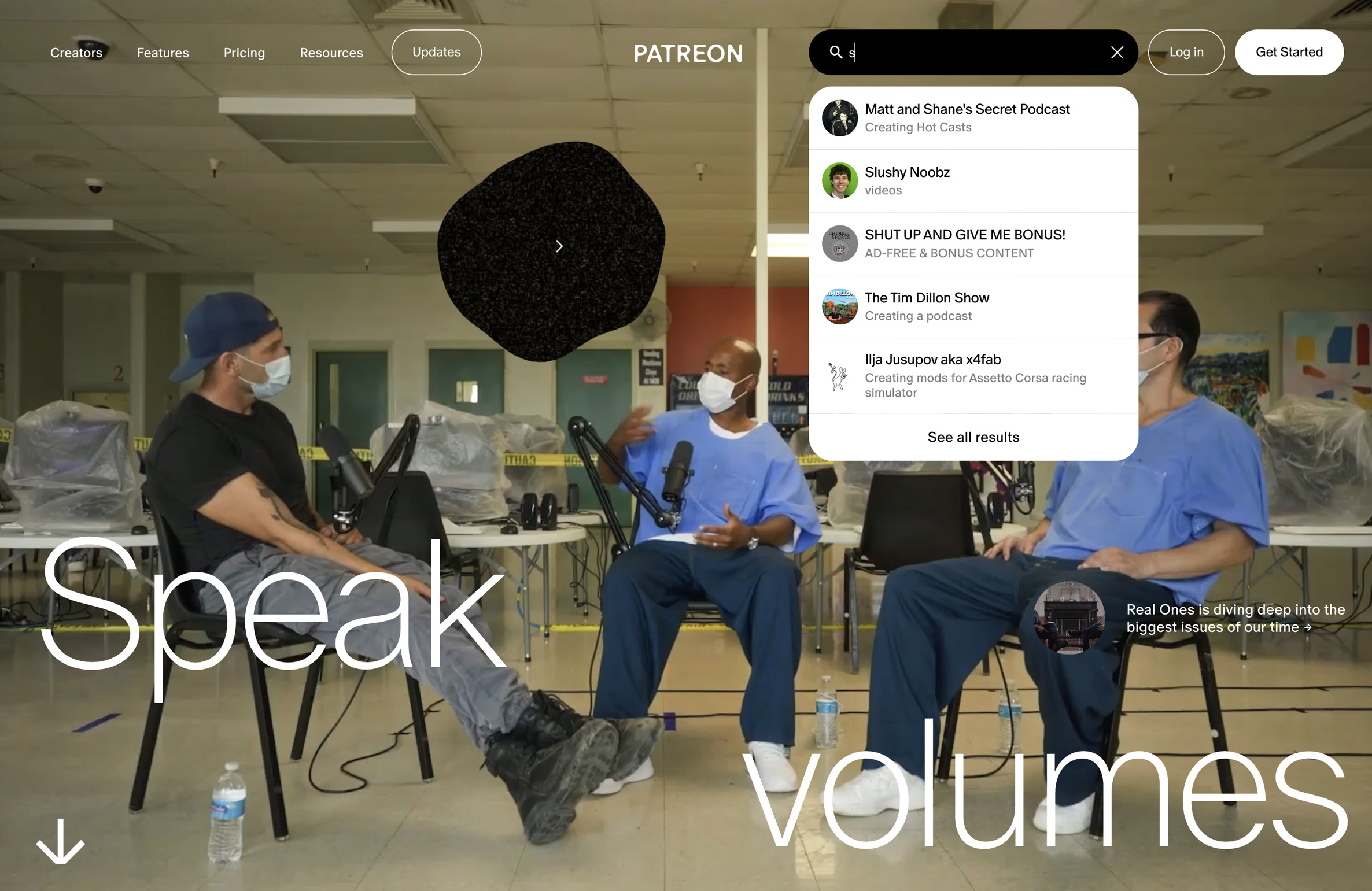
Current Experience
Pateron’s basic search input limits the diversity and breadth of talent. The interface feels unintuitive, and the ambiguous navigation makes it harder for users to confidently move through the experience.

Design Process
User Research
01. Generative User Interviews (Open ended questions):
Given the time constraints, user interviews were chosen as an efficient research method to understand users’ motivations, behaviors, and pain points through direct conversations; insights that surveys or focus groups other research methods may not fully capture or need more time. We conducted five interviews with both existing users and new users who had heard of the platform but had never used it.
During the interviews, I included a task-based activity where participants explored the platform in real time while I observed their behaviour. Watching them navigate first-hand gave me valuable insights into what content they look for, how they try to find it, and where they face difficulties. This generative research helped us understand user expectations and pain points, while also highlighted opportunities to improve and create a more user-centred discovery experience.

“I would have loved to hear a snippet of the music of this person to see whether I like them or not before I join. A free trial, or an example of sort.. or a lot of detail about something before I put money behind it would be important to me.”
Interviewee 01| Research Scientist, new user
“I would trust something, like.. a personal recommendation from a friend, or a voice I already know, a content creator I already trust. Given choice needs to be valuable to me.”
Interviewee 04| Lawyer, familiar with the platform
Synthesising Interview Data
Using Dovetail

We used software Dovetail to organise all interview notes and observations in one place. Key insights were tagged, grouped, and compared across participants. This helped us quickly identify recurring behaviours, pain points, and themes. The tool made synthesis faster and more structured, resulting in clearer insights.
Using AI (ChatGPT)

We also used ChatGPT to summarise and synthesise interview data. It helped us condense transcripts as it highlighted key themes, and organised user insights. This tool supported quicker pattern recognition and idea generation. It made the synthesis process faster and more streamlined.
02. Usability Audit and Competitor Benchmarking:
To better understand where users experience friction, we carried out a usability audit of the existing platform. This included a heuristic evaluation based on Jakob Nielsen’s 10 usability heuristics, user-flow walkthroughs to assess task efficiency, and a competitor benchmark to see how similar platforms handle engagement and discovery.
Method: Heuristic evaluation based on Jakob Nielsen’s 10 usability heuristics + user flow walkthrough + competitor benchmarking.
Usability Audit (SWOT)
The usability audit highlighted both strengths and areas for improvement in the platform. While the
- focus on creators and projects was a clear strength
- conflicting navigation created friction for new users
- Opportunities emerged around improving discovery, simplifying navigation, and offering personalized suggestions to better engage first-time patrons and support seamless content exploration.

Direct Competitors
The competitor benchmarking revealed key strategies used by direct competitors. Some notable points were that
- they effectively showcased their work,
- actively engaged with their audience, and
- tracked progress in ways that inspired patron support
These insights helped identify opportunities for enhancing content visibility, engagement, and user motivation on our platform.

Indirect Competitors
Our indirect competitor review highlighted how platforms like YouTube excel in content discovery through strong recommendation algorithms driven by user behaviour and popularity trends. However, while discovery is seamless,
- these platforms lack deeper creator–fan relationship building and
- do little to promote niche creators beyond mainstream visibility.
This contrast revealed opportunities to create a more personal, community-driven support system within our platform.

Research Findings :
Key Insights
Users show a strong inclination toward discovering creators by topics, interests, and creative categories rather than through general browsing. A more structured topic-based discovery system, supported by features such as “Trending”, “New Creators”, or category-specific highlights helps users navigate content efficiently. This gives them a sense of direction and reduces the cognitive load of exploring the vast creator landscape.
Instead of purely algorithmic suggestions, participants preferred recommendations shaped by their own interests, creators they already trust and to some extent their follow history. They want platforms to surface similar creators, related themes, and complementary content based on what they actively engage with. This creates a more human-centred, intentional discovery experience that feels curated rather than automated, making users more confident in exploring new creators.
Participants expressed that quick content previews significantly influence their decision to explore further. Elements like short video clips, audio snippets, artwork thumbnails, or summary excerpts help users evaluate the creator’s style and value instantly. Offering these previews acts as a hook, boosting engagement while making the discovery experience more satisfying and time-efficient.
Community-driven visibility matters. When established or trusted creators endorse, collaborate with, or spotlight emerging creators, users are more inclined to explore them. These peer-to-peer signals create a sense of credibility and curiosity. Creator-to-creator amplification builds a supportive ecosystem, helping lesser-known artists grow through shared visibility and trust-based discovery.
Ideation
Rapid Ideation Process
Mind mapping allowed us to step back from assumptions and explore adjacent opportunities. It highlighted that discovery and evaluation were tightly connected. Users weren’t just struggling to find creators, but also struggled to feel confident supporting them. This guided us in broadening and refining our solution direction.
Discovery of the Problem Statement


Low Fidelity Wireframing
We created low-fidelity wireframes to explore and validate key user flows across Patreon, with a particular focus on search navigation, topic-based discovery pages (such as podcasters), and individual creator pages. These wireframes prioritised content hierarchy, navigation clarity, and core actions, allowing us to quickly test how users discover creators, browse by interest, and engage with creator profiles. By keeping the wireframes intentionally minimal, we were able to iterate rapidly, align on structure, and refine usability before moving into high-fidelity designs.


UI Styles and Variables
We used Figma as our primary design tool to streamline collaboration and maintain consistency throughout the project. We began by defining text and colour styles, along with variables, to establish a scalable design system and ensure visual consistency across all screens. This foundational setup allowed us to make global updates efficiently and reduced design inconsistencies.
Building on this, we created reusable components for commonly used UI elements such as buttons, input fields, and navigation elements. These components helped speed up the design process, improved alignment across the interface, and made future iterations easier to manage.
Set up in Figma: Use of variables and components to ensure visual consistency and efficiently make global updates:
Styles |
Text and Colour
Grid System

Variables |
Primitive: Type and Colour
Semantics: Colour

Buttons and Reusable components


Iterations – Search Navigation
Before

After
Problem: Users were hesitant to engage with the original compact search bar, as it did not provide a comprehensive search unless the users knew exactly the name of the creator they were looking for, which was relatively restraining.
Solution:
- Adding categorisation helped users find relevant content faster, reduce cognitive load, and navigate a large creator ecosystem efficiently. Because Patreon hosts millions of creators, memberships, and posts, structured search prevented the experience from feeling overwhelming.


Categories Experience | Find Creators

Before
Problem: The search felt limited and time consuming. Did not help with the decision making of whether any interest in a particular creator is to be explored.
Solution: A new experience for each content category helped users explore the available pool of creators.
A snippet and quick preview helped them in easy decision also further catering their need for interest in a particular creator.

After

Creators Page

User Testing & Feedback
Tests in Maze with 10 users I 4 repeat & 6 new users:
Positive Observations
92% of participants completed the tasks without errors
60% found the usability of the search bar navigation satisfactory
Pain Points
38% users struggled with finding ‘Show all Results’ button
10% had problem with ‘closing preview’ section
“The interface is quite easy to navigate. Overall search functionality is very helpful to find favourite artist”
“Show all results was a bit difficult to locate. Since we have a habit of reading left to right, the option being at left was not helping. The rest felt intuitive”
Cohort Feedback:
“Love the categories and functionalities, nice search bar!”
“I really like the creator’s type dedicated page and from the user’s perspective the fact that you can see more without logging in, I wonder however how that would affect the conversion.”
“I love the categorisation and different functionalities of the search bar
I love how users can still explore different creators while not logged in – love the join for free indicator to non-logged in users
Love seeing the redesign of the different screens.”
“Good job on the content categorisation! I like how you’re creating an atmosphere for each category that way”
“This is some excellent thinking and considerations while you’re building. Great work!”
Reflections
What would we have done differently?
-
With more time, we could have explored on the visual hierarchy of preview section, and developed an UX for creator’s offers
-
During the design phase, we frequently revisited the button components to adapt them to new requirements. Moving forward, we plan to be more mindful of potential variations like sizes and button states in advance.
-
During user testing, we observed that our feedback requests were too generic. Moving forward, we could improve, by breaking down tasks and be more specific about our end goals.
Next Steps
We plan to implement the suggested design changes and conduct a follow-up round of testing with the same user groups to evaluate improvements.

Reposition “See all results” and test its visibility
Reposition and enhance the CTA with colours to ensure optimal visibility and ease of use
Explore the onboarding journey
Revisit the wireframes to design distinct onboarding journeys for creators and fans
Explore the AI feature further
Revisit the wireframes to design AI functionality.